
Now you should have the game installed, but where is it? Good question! If you opted to not have the installer not install a desktop ICON, then you will find the game in the Windows Program list, as follows.
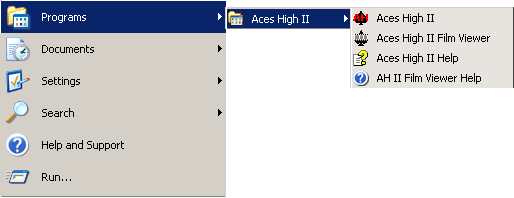
From your Windows desktop, press the "Start" button, then select "Programs" or "My Programs" from the menu. If the game was properly installed, you should see "Aces High" in your programs list, as shown above.
From there, move your mouse cursor over the "Aces High" menu and another menu item will pop up. From that pop-up, select "Aces High".
Now, if the above is not true and you do not see "Aces High" in your programs list, then you either did not save and execute the installation program, or tried to open the installation program remotely.
Don't worry, we won't tell. You just need to download, save, and execute the installer and all will be well.


